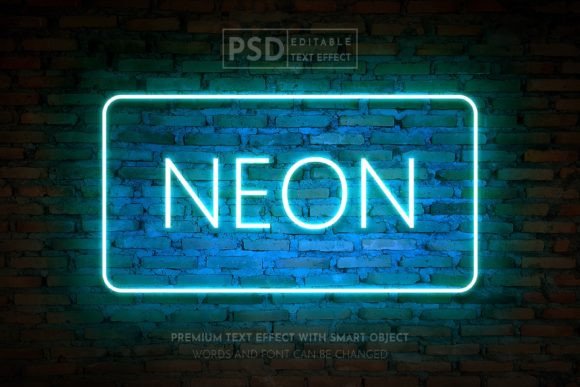
Neon Glow Wall Realistic Text Effect Guide
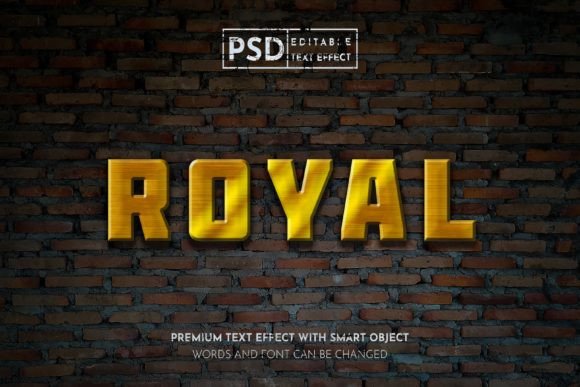
There is a specific kind of energy that neon brings to a visual composition. It is not just about brightness; it is about atmosphere. The Neon Glow Wall Realistic Text Effect captures the gritty, electric vibe of urban nightlife and translates it into a digital asset that feels tangible. When you look at this effect, you do not just see letters. You see light bending around brick, shadows cast by glowing tubes, and the subtle imperfections that make a scene feel lived-in and authentic. For designers working in Photoshop, having access to a high-quality, editable PSD file for this style saves hours of manual rendering and layer styling.
This resource is designed for versatility. Whether you are crafting a headline for a social media promotion on Instagram, designing a flyer for an underground music event, or creating a bold poster for a magazine spread, the realism of this effect adds immediate depth. Unlike flat vector graphics, this text effect simulates physical properties. The color mode is set to RGB, which is essential for any project destined for screens. This ensures that the glow blooms correctly on web designs, digital publications, and social platforms like Twitter and Facebook, where backlit displays can truly showcase the luminance of the neon simulation.
Visual Impact and Brand Personality
The personality of neon is inherently bold. It demands attention. In the context of brand identity, using a neon glow effect signals modernity, excitement, and often a touch of rebellion or nostalgia, depending on the color palette you choose. Pink and blue hues might evoke a retro 80s synth-wave aesthetic, while stark white or electric green can feel more industrial and contemporary. This makes the Neon Glow Wall Realistic Text Effect a powerful tool for businesses looking to stand out in a crowded digital landscape.
When applied to logo design or promotional headers, this effect influences visual hierarchy significantly. The human eye is naturally drawn to light sources. By wrapping your key message in a realistic glow, you ensure that the viewer’s focus lands exactly where you want it. This is particularly useful for social media graphics, where users scroll rapidly through feeds. A static image with a dynamic lighting effect creates a "stop-the-scroll" moment. It adds a layer of professionalism and polish that flat text often lacks, suggesting that the brand behind the image pays attention to detail and quality.
Furthermore, the texture of the wall behind the text plays a crucial role in the overall appeal. The roughness of the surface contrasts with the smooth, consistent light of the neon tubes. This interplay between organic texture and artificial light creates visual interest that keeps the viewer engaged longer. It transforms a simple typographic statement into a scene, inviting the audience to imagine the environment surrounding the text. This emotional connection is vital for effective marketing and editorial design, where storytelling is as important as information delivery.
Practical Applications Across Media
The utility of this text effect extends far beyond simple web banners. Because the files are fully layered and organized, you can adapt the effect for a wide range of creative projects. For entrepreneurs and small business owners, this is an invaluable design asset. You do not need to be a senior graphic designer to achieve a high-end look. The smart object functionality means that the technical heavy lifting has already been done. You simply insert your content, and the lighting, shadows, and reflections adjust automatically.
Consider its use in event promotion. A nightclub, concert, or festival poster benefits immensely from the association with neon lighting. It sets the tone before the reader even processes the date or location. Similarly, for packaging design mockups or product launches targeting a younger demographic, incorporating this effect into digital ads can create a cohesive and trendy aesthetic. It works equally well for publication promotions, such as magazine covers or feature articles that discuss technology, nightlife, fashion, or urban culture.
In the realm of web design, these images can serve as hero section backgrounds or featured post thumbnails. Since the output is optimized for RGB, the colors remain vibrant and true to life on monitors and mobile devices. However, it is important to note that this specific effect is tailored for digital viewing. If you are planning to print a flyer or poster, ensure your printer can handle the high-resolution JPG files included in the package, or convert the PSD carefully to CMYK while monitoring color shifts, though the primary strength here remains in digital and screen-based media.
Workflow Efficiency and Customization
One of the most compelling features of this product is its ease of use. In professional design workflows, time is money. Creating a realistic neon effect from scratch involves complex layer styles, blending options, mask painting, and careful attention to light diffusion. With this Neon Glow Wall Realistic Text Effect, that process is reduced to seconds. The file structure is clean, with folders logically separated for background, text, glow, and effects. This organization allows even those with no advanced Photoshop skills to produce professional-grade results.
To edit the file, you simply double-click the smart object layer. This opens a new tab where you can paste your own design or type your desired text. Once you save and close that tab, the main document updates instantly. The smart object retains all the lighting calculations and perspective adjustments. This non-destructive editing method means you can experiment with different fonts, lengths of text, and layouts without breaking the effect. It encourages creativity because there is no penalty for trial and error.
The inclusion of both PSD and high-resolution JPG files provides flexibility. If you need to make quick changes, you use the PSD. If you need to drop the image directly into a video editor, presentation, or content management system, the JPG is ready to go. This dual-format approach caters to both designers who want full control and marketers who need speed. The high resolution ensures that the text remains crisp, with no pixelation around the glowing edges, maintaining the illusion of reality.
Choosing the Right Typography and Pairings
While the effect itself is stunning, the choice of typeface within the smart object matters. Not all fonts render well as neon tubes. Generally, sans serif fonts with uniform stroke widths work best because they mimic the physical construction of real neon bending. Thick, bold typefaces create a stronger glow and are more readable from a distance. Thin, delicate script fonts can look elegant but may lose their impact if the glow overwhelms the letterforms. When selecting your text, consider the legibility against the wall texture. High contrast between the neon color and the background wall is essential for readability.
For those interested in font pairing, remember that the neon effect is a display element. It should be treated as a headline or accent. Pair it with clean, minimal typography for body copy or secondary information. Do not try to apply the neon effect to large paragraphs of text, as this will reduce readability and dilute the visual impact. Use it sparingly to highlight key messages, brand names, or calls to action. This strategic application enhances the perceived value of your creative font choices and maintains a balanced composition.
Ultimately, the Neon Glow Wall Realistic Text Effect is more than just a filter. It is a comprehensive design solution that bridges the gap between conceptual ideas and polished execution. By providing a realistic, editable, and high-quality asset, it empowers creators to elevate their visual communication. Whether you are building a brand presence on social media or designing a standout promotional campaign, this tool offers the professional edge needed to capture attention in a visually saturated world.