Integrating Procreate Brush 112 – Abstract Suite into Your Digital Workflow
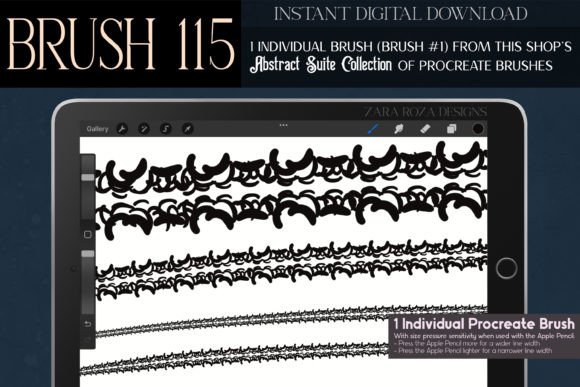
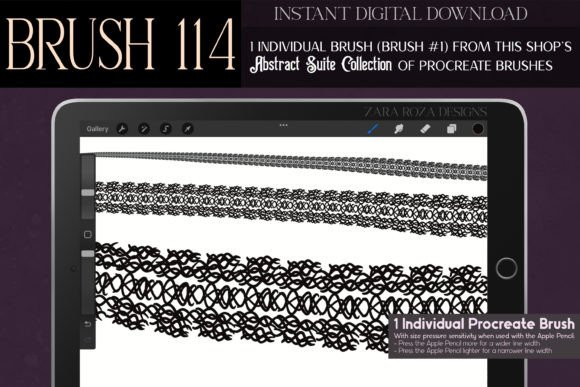
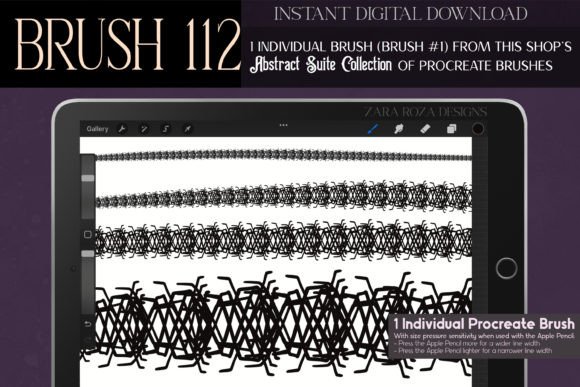
In the rapidly evolving landscape of digital illustration, the difference between a generic design and a standout piece often lies in the texture and character of the line work. For professionals, hobbyists, and entrepreneurs who rely on visual storytelling, finding tools that offer both versatility and distinct personality is crucial. The Procreate Brush 112 – Abstract Suite represents a specialized asset designed to bridge the gap between hand-drawn authenticity and digital efficiency. This tool is not merely a stamp or a preset; it is a custom-crafted instrument derived from digitally hand-drawn illustrations, offering a unique aesthetic that spans Art Deco, Art Nouveau, Dark Academia, and Steampunk influences.
Understanding how to integrate this brush into your broader creative process requires looking beyond its immediate visual appeal. It involves assessing where it fits within your project lifecycle, how it interacts with other digital assets, and how it can streamline your workflow while maintaining high-quality output. Whether you are designing jewelry concepts, creating fashion illustrations, or developing intricate border elements for wedding stationery, this brush serves as a functional component of a larger production pipeline.
Defining the Asset and Its Strategic Role
The Procreate Brush 112 – Abstract Suite is an instant digital download compatible with the Procreate app on iPad, iPad Pro, and iPhone. Its primary value proposition is its ability to generate complex, organic, and stylized lines with minimal effort. Unlike standard geometric brushes that produce uniform results, this suite captures the quirks of hand-drawn ink pen doodles, translating them into a reusable digital format. This makes it particularly valuable for creators who need to maintain consistency across multiple assets without sacrificing the "human touch" that clients and audiences often crave.
In a professional workflow, this brush functions as a textural layer enhancer. It is rarely the sole foundation of an image but rather a critical element used during the detailing and embellishment phases. By providing pre-designed abstract lines, curly branches, spider webs, and lace-like patterns, it reduces the time spent on repetitive manual drawing. This allows artists and designers to focus their energy on composition, color theory, and overall narrative structure, knowing that the intricate linework is handled by a reliable, high-quality tool.
Pre-Production: Preparation and Compatibility
Effective use of any digital asset begins with proper setup. Before integrating the Procreate Brush 112 – Abstract Suite into a live project, ensure your hardware and software environment is optimized. Since the brush requires the Procreate app, verify that your iPad or iPhone is running a compatible version of the software to avoid latency or rendering issues. For professionals working on high-resolution prints, such as large-format wall art or detailed fashion plates, setting up your canvas at a high DPI (dots per inch) before importing the brush is essential. This ensures that the intricate details of the gothic, Victorian, or mystical lines remain crisp when scaled.
Organization is another key factor in pre-production. Create a dedicated brush set within Procreate for your abstract and decorative tools. Placing the Abstract Suite alongside other complementary assets—such as standard ink pens, watercolor textures, or symmetry guides—creates a streamlined workspace. This reduces context switching and keeps your creative momentum intact. For educators and students, this organizational step also serves as a teaching moment, demonstrating how digital asset management contributes to long-term efficiency.
Execution: Integrating the Brush into Creative Processes
Once prepared, the brush can be deployed across various stages of the creative process. Its versatility allows it to adapt to different industries and project types. Below are practical examples of how to implement this tool effectively.
Fashion and Textile Design
In fashion illustration, the Abstract Suite excels in rendering fabric textures and garment embellishments. Use the brush to sketch intricate lace patterns on bridal gowns or to add steampunk-inspired mechanical details to avant-garde outfits. The brush’s ability to mimic ink pen doodles makes it ideal for creating quick yet detailed sketches of jewelry, such as necklaces and bracelets, allowing designers to visualize accessories without spending hours on manual rendering. When combined with Procreate’s symmetry tools, you can create balanced, repeating patterns for textile prints, ensuring that the design remains consistent across the fabric layout.
Stationery and Event Branding
For entrepreneurs specializing in wedding invitations, holiday cards, or party decorations, this brush offers a rapid way to add elegant borders and ornamental frames. The Art Deco and Art Nouveau influences provide a classy, luxury feel that appeals to high-end clients. You can use the brush to create custom headers for Thanksgiving menus, Halloween party invites, or Christmas gift tags. By adjusting the opacity and flow settings, you can layer these abstract lines over watercolor backgrounds or solid colors, creating depth and visual interest. This approach significantly speeds up the production of seasonal collections, allowing small business owners to respond quickly to market trends.
Tattoo and Body Art Conceptualization
Tattoo artists often spend considerable time refining line work before transferring designs to skin. The Procreate Brush 112 – Abstract Suite can be used to generate base structures for witchy, magical, or nature-inspired tattoos. Elements like curly branches, spider webs, and mystical symbols can be arranged and manipulated to fit specific body contours. This allows artists to present clients with multiple variations of a design quickly, enhancing the consultation process and improving client satisfaction.
Post-Production: Refinement and Quality Control
After applying the brush strokes, the workflow moves into refinement. Digital tools offer the advantage of non-destructive editing. Use layer masks to trim excess lines or blend the abstract elements seamlessly into the background. For projects requiring bold graphic design, such as anime or manga illustrations, adjust the contrast and saturation to make the lines pop against flat colors.
Quality control involves checking the scalability of the design. If the artwork is intended for large-scale printing, zoom in to 100% or more to ensure that the abstract lines do not appear pixelated or disjointed. If necessary, rasterize the layer and apply slight sharpening filters to enhance clarity. For web-based content, such as social media graphics or blog headers, ensure that the file size is optimized without compromising the intricate details of the brushwork.
Long-Term Utility and Workflow Efficiency
The true value of the Procreate Brush 112 – Abstract Suite lies in its long-term utility. Unlike one-off design elements, this brush becomes a permanent part of your digital toolkit. Over time, you will develop a personal library of compositions created with this tool, which can be repurposed for future projects. For example, a border designed for a Valentine’s Day card can be recolored and modified for a spring-themed promotional flyer. This reusability enhances return on investment and supports sustainable creative practices.
Furthermore, the brush encourages experimentation. Its quirky, abstract nature invites users to break away from rigid design conventions. Educators can use it to teach students about the intersection of traditional art styles—such as Gothic and Victorian—with modern digital techniques. Hobbyists can explore new aesthetics, from kawaii cute designs to dark academia motifs, expanding their artistic range without needing advanced technical skills.
Conclusion
Integrating the Procreate Brush 112 – Abstract Suite into your workflow is more than just adding a new tool to your arsenal; it is about enhancing your capacity for detailed, stylish, and efficient creation. By understanding its role in pre-production, execution, and post-production, you can leverage its unique characteristics to elevate your projects. Whether you are designing fashion accessories, creating event stationery, or conceptualizing tattoo art, this brush provides the flexibility and quality needed to meet professional standards. Embrace the process, organize your assets, and allow the abstract elegance of this tool to streamline your creative journey.